
5 Steps to Build AI Agent Feedback Loops
13 Apr 2026
A practical five-step framework to deploy, monitor, validate and automate AI agent feedback loops for compliant, continuous improvement.
AI agents often start strong but can lose effectiveness over time without feedback loops to refine their performance. This guide outlines five steps to help ensure your AI systems stay relevant and effective:
Deploy in a Live Environment: Launch your AI agent in a controlled, real-world setting to collect user data while ensuring compliance with regulations like GDPR.
Gather Feedback: Use direct feedback (e.g., ratings) and indirect behaviour signals (e.g., user edits, abandonment rates) to understand performance.
Analyse Data: Identify trends in metrics like success rates, costs, and error patterns to pinpoint issues and prioritise fixes.
Implement and Validate Updates: Test changes through controlled rollouts and shadow modes, ensuring updates improve performance without introducing new issues.
Automate Feedback Loops: Streamline data collection, analysis, and updates to continuously refine your AI system.
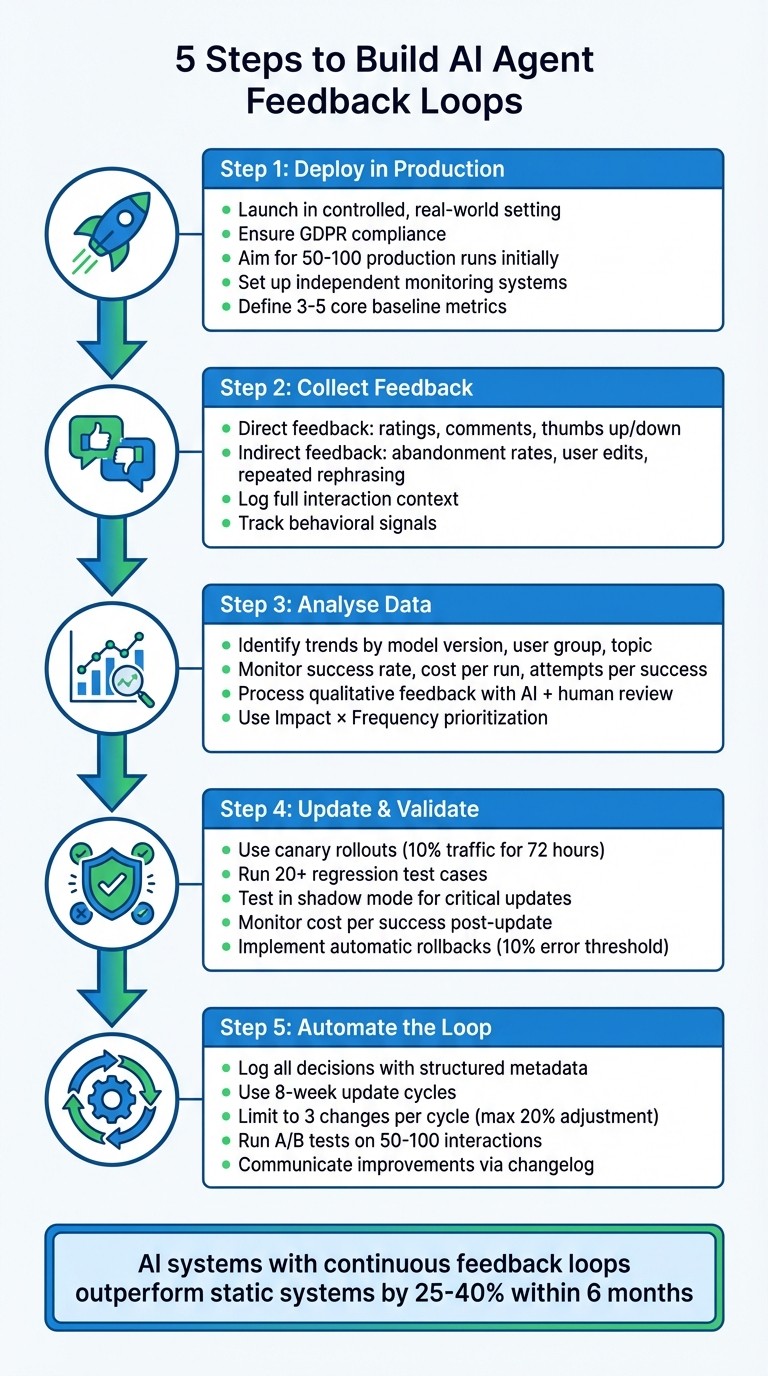
5-Step Process to Build AI Agent Feedback Loops
Step 1: Deploy Your AI Agent in Production
The first step is to deploy your AI agent in a live environment to start collecting real-world user data. This doesn't mean launching it to a massive audience right away. Instead, focus on creating conditions where you can observe genuine user behaviour and gather meaningful performance insights.
When deploying, UK GDPR compliance must be addressed immediately. This includes implementing middleware to redact API keys, hash or exclude user PII, and enforce strict data retention policies. As Marinela Profi, Global AI & GenAI Marketing Strategy Lead at SAS, explains:
"Compliance with financial regulations (such as GDPR, PCI-DSS, etc.) is part of the environment. The fraud detection system must be aware of legal constraints when it collects, processes, and stores sensitive data."
To stay within these regulations, store only the data necessary for evaluation - such as candidate outputs and judge verdicts. Avoid keeping complete interaction logs and instead retain anonymised aggregates for long-term analysis. Full data payloads should only be stored temporarily. With compliance in place, the next step is to establish a solid monitoring system.
Set Up Monitoring Systems
Monitoring is crucial to track the agent's full session trajectory, including tool usage, memory operations, and reasoning processes. This structured execution trace helps you identify where and why failures occur.
Your monitoring system should act as an independent observation channel, separate from the agent itself, to avoid biased self-reporting. Implement safeguards like hard limits on the number of iterations per chain (e.g., a maximum of three), strict budget caps, and wall-clock time restrictions to prevent runaway loops. Without these controls, an agent might repeatedly call a broken tool, consuming thousands of tokens in minutes.
To get meaningful insights, aim for at least 50–100 production runs during the initial deployment phase. Once monitoring is in place, you can move on to defining baseline metrics.
Define Baseline Metrics
Baseline metrics serve as the foundation for measuring future improvements. Focus on four key areas:
Task performance: Completion and success rates.
Efficiency: Metrics like latency and cost per task.
Quality: Factors such as accuracy, relevance, and factual correctness.
Safety: Compliance with policies and PII leak rates.
AI agents tend to use significantly more tokens than standard chatbot interactions - about 4× more, or up to 15× in multi-agent systems. This makes cost-per-task a vital efficiency metric to track.
Start with a small set of 3–5 core metrics and expand as your system evolves. Create a 'golden dataset' of inputs with verified outputs for regression testing. It's not just about whether the agent produces the correct answers; you also need to examine the reasoning process behind those answers. Analysing the "chain of thought" is critical for diagnosing potential quality issues or logical flaws, ensuring the system remains reliable as it adapts over time.
Step 2: Collect Direct and Indirect Feedback
Once your agent is live, gathering two types of feedback is crucial: direct (explicit) and indirect (implicit). Direct feedback includes tools like thumbs up/down buttons, star ratings, and user comments. Indirect feedback, on the other hand, comes from behavioural cues such as abandonment, repeated rephrasing, or how much users edit the agent's responses. Both are important but serve distinct purposes.
Direct feedback is specific but tends to have low engagement, as users usually only respond to particularly good or bad experiences. Indirect feedback, while messier, captures insights from every interaction, including those from users who don’t actively provide comments. Together, these feedback types form the foundation for ongoing performance improvements.
Implement Feedback Collection Mechanisms
Make direct feedback easy and immediate. Place thumbs up/down icons directly next to each AI response instead of relying on end-of-session surveys. Users are far more likely to interact with simple tools in the moment. If someone clicks "thumbs down", follow up with an optional text box or dropdown menu (e.g., "Agent misunderstood", "Response too slow") to understand their dissatisfaction.
For feedback to be useful, log the full context of the interaction alongside the rating. This includes the user’s query, the agent's response, and any tools or features used during the exchange. Without this context, negative ratings can be difficult to interpret and act upon.
Gather Behavioural Data
Behavioural signals often uncover insights that explicit ratings miss. Track key metrics like abandonment rates to see where users leave conversations prematurely, repeated rephrasing when users ask the same question in multiple ways, and modification ratios to measure how much users edit the agent’s output. For instance, if a user gives a thumbs up but heavily rewrites the response, it suggests a lack of trust that explicit feedback alone wouldn’t reveal.
Keep an eye on escalation triggers - the specific topics or responses that frequently lead users to request human assistance - and monitor "copy-paste" behaviour, where users copy responses to verify them elsewhere. Additionally, long pauses between the agent’s reply and the user’s next action may signal confusion or the need for external confirmation. While these signals require interpretation, they provide a deeper understanding of user behaviour that explicit ratings often overlook.
Step 3: Analyse Feedback Data
After gathering both direct and indirect feedback, the real work begins - making sense of it all. Raw data on its own won't get you far. You need to uncover patterns, interpret user comments, and prioritise meaningful changes. This step is all about turning scattered input into a clear, actionable plan.
Identify Trends and Patterns
Start by organising your numerical data. Break it down by dimensions like model version, prompt template, user group, and conversation topic. This will help highlight regressions or knowledge gaps.
Keep an eye on time-series metrics to understand efficiency trends. Metrics to monitor include:
Success rate per run: Tracks reliability over time.
Cost and latency per successful run: Shows economic and performance trends.
Attempts per successful outcome: Indicates whether your agent is becoming more efficient or if recent updates have caused confusion.
Another critical area is failure-mode distribution. Categorise errors - like invalid JSON, missing steps, or hallucinations - and monitor their frequency. A single mistake might be random, but if dozens of users flag the same issue, it's likely a systemic problem that needs fixing.
Here’s a quick look at key metrics and what to watch for:
Metric | Purpose | Trend to Watch |
|---|---|---|
Success Rate per Run | Measures overall reliability | Should improve over time |
Attempts per Success | Tracks agent efficiency | Should decrease with improvements |
Cost per Success | Assesses economic viability | Should stabilise or drop |
Abandonment Rate | Gauges user frustration | Spikes suggest friction points |
Escalation Rate | Measures resolution capability | High rates indicate unsolved issues |
Quantitative trends are essential, but they only tell part of the story. Pair them with insights from user narratives for a fuller picture.
Process Qualitative Feedback
User comments and open-ended responses require a different approach. Large language models can help speed up the initial organisation by coding and grouping phrases like "usability concerns" or "support issues." Sentiment analysis tools can also classify feedback as positive, negative, or neutral. For deeper insights, techniques like Latent Dirichlet Allocation (LDA) can reveal hidden themes.
However, as Jason Jacobson, Senior Director of Consumer Insights at Sekisui House, points out:
"AI alone can't interpret nuanced, context-heavy data. The human touch ensures the right questions are asked at the right time, improving both the efficiency and authenticity of the insights."
In other words, AI is great for scale and speed, but humans are better at catching subtle details and context. Use AI to sort through large datasets, but rely on human expertise to refine themes and interpret complex feedback.
Before diving into analysis, make sure your feedback is of good quality. Use heuristics and checks - like ensuring responses meet length requirements, include citations, or match a specific format (e.g., JSON schema) - to filter out noise and focus on meaningful data.
Prioritise Improvements
Once you've mapped out both numerical trends and qualitative themes, it’s time to prioritise. Focus on areas where changes will have the greatest effect. Use an Impact × Frequency approach to address issues affecting the largest number of users. Pay extra attention to feedback related to high-stakes scenarios, such as financial transactions or account modifications, as these carry more significant consequences.
Distinguish between isolated incidents and widespread issues through failure-mode analysis. If a problem affects many users, it demands immediate action. On the other hand, a one-off issue might not justify major resources unless it involves something critical.
Finally, categorise potential improvements using a framework like Accelerate to MVP, Incubate, Research, or Shelve. This helps you focus on impactful changes while avoiding distractions from less critical requests.
Step 4: Update Your Agent and Validate Changes
Now that you've pinpointed the areas needing improvement, it's time to implement those changes and ensure they work as intended. Careful testing is key to maintaining stability while enhancing functionality.
Test Updates Before Full Deployment
Avoid rolling out updates to all users at once. Instead, use canary rollouts - release the update to just 10% of live traffic for 72 hours. This lets you compare performance with the current version and catch issues early without widespread disruption.
Run regression tests to make sure your fixes don't interfere with existing functionality. Aim for at least 20 test cases that cover typical scenarios, edge cases, and potential problem areas. Change one variable at a time to clearly identify the source of any performance shifts.
Another useful approach is shadow mode, where updates are tested on real data without affecting users. For critical updates, include human-in-the-loop approval, where a reviewer signs off on changes before they go live. This oversight has been shown to reduce production incidents by about 60% compared to fully automated deployments.
Monitor Post-Update Metrics
Once the update is live, keep a close eye on your metrics to confirm it's working as expected. Track system efficiency metrics like latency, token usage, and tool-call counts to identify any bottlenecks or cost increases. Also, monitor session-level outcomes such as task success rates and step completion to ensure users can achieve their goals effectively.
Pay special attention to cost per success. This metric considers the total cost of all attempts, not just the final successful one. An agent that achieves success through costly retries might show better accuracy but could become economically unsustainable. Use a graded scoring system (0–100) across areas like efficiency, reliability, and safety to spot subtle regressions that binary pass/fail labels might miss.
Set up automated alerts for significant changes in evaluator scores, latency, or costs. Also, track both the inputs/outputs and the reasoning process behind them to ensure your agent isn't succeeding for the wrong reasons.
Manage Risks with Rollback Systems
Even with thorough testing, updates can sometimes go wrong. Minimise risks by implementing automatic rollbacks. These systems revert to the previous stable version if error rates exceed a set threshold, often around 10%. Ensure every change is versioned with immutable datasets and tagged configurations so rollbacks can be executed in minutes, not hours.
Before deploying updates widely, establish clear promotion criteria. Only proceed if the new version outperforms the baseline on critical tasks and maintains key KPIs like cost per successful run. Limit the number of changes per tuning cycle to three at most, reducing instability and making it easier to pinpoint the effects of each tweak. A structured validation process can help catch issues early, saving time and resources in the long run.
Step 5: Automate and Sustain the Feedback Loop
Once updates are validated in Step 4, it's time to streamline the process by automating your feedback loop. This step transforms feedback from a periodic task into an ongoing system for improvement. Relying on manual intervention at every stage simply isn’t practical as your system scales.
Automate Data Collection and Processing
Start by logging every decision with structured metadata, such as input hashes, features, reasoning, and confidence levels. This creates a detailed audit trail, enabling asynchronous reviews and pattern analysis without disrupting the user experience. Use background workers to perform automated checks - like validating JSON schemas or ensuring self-consistency - immediately after responses. This allows you to catch potential issues in real time.
Automation should cover explicit feedback, behavioural cues, and system-level data. Each type provides unique insights. For instance, a "thumbs down" indicates dissatisfaction, while user behaviour, like copying and pasting a response, suggests the output was helpful even without explicit feedback.
Consider using a weekly tuner agent to analyse logs, identify problem clusters, and suggest adjustments. A great example of this is Braincuber Technologies' work in March 2026. They helped a US logistics client reduce purchase order misclassification rates from 8.3% to 1.2% in just 31 days. By routing classification errors to the extraction layer and automating feedback loops, they achieved better results than a costly (£21,000) manual retraining effort, which only managed to lower the rate to 7.9%.
"The agents in production today that improve reliably are the ones with boring, well-structured feedback loops rather than clever architectures." - ainative.builders
Incorporate Feedback into Regular Updates
Feedback should be integrated into updates using a structured cycle - an 8-week process works well. This includes two weeks for establishing a baseline, two for making adjustments, and two for stabilisation (aiming for a dismissal rate below 15%). This approach avoids knee-jerk reactions and ensures that updates are based on robust data.
To maintain stability, apply safety measures to limit dramatic changes. For instance, restrict updates to three threshold adjustments per cycle, with each change capped at 20%. Before rolling out any proposed adjustments, run automated A/B tests on 50–100 interactions to ensure the new configuration performs better than the baseline. This controlled process helps continuous learning systems outperform static ones by 25–40% within six months.
Feedback should also be routed to the appropriate system layers. For example, if API timeouts occur, update the integration layer. If there are logic errors, refine the reasoning policy. This targeted approach addresses root causes rather than just treating symptoms.
Communicate Improvements to Users
Once improvements are made, keep users informed with a clear and concise changelog. Use version numbers (e.g., v1.1.0) and 2–5 bullet points to highlight key updates. This transparency builds trust and encourages users to keep providing feedback.
When users see their input leading to real improvements, they’re more likely to stay engaged. This creates a positive feedback loop where better input leads to better updates, which in turn encourages more input. Without active tuning and communication, AI systems can experience alert dismissal rates (false positives) of up to 40% by the third week of production. However, with structured updates and clear communication, you can maintain user confidence and long-term engagement.
Conclusion
Our five-step process demonstrates how feedback loops transform each production run into a chance for targeted, measurable progress. These loops aren't about achieving perfection right out of the gate - they're about fostering ongoing improvement. From deployment to automation, every step strengthens the system's ability to adapt and address real user needs.
Research shows that AI systems equipped with continuous learning loops outperform static systems by 25–40% within just six months. Most agents exhibit noticeable improvement after only 2–4 weeks of operation (with at least 50–100 runs). This isn't about retraining model weights - it’s about fine-tuning the system. By refining prompts, context, memory policies, and tool constraints based on actual usage data, the system evolves to meet demands more effectively.
These loops don't just enhance technical performance - they bring clear business benefits too. They minimise the need for manual corrections, enabling teams to scale operations without adding more staff. Recurring errors are transformed into opportunities for permanent fixes, and metrics like "cost per successful run" help identify where efficiency gains can be made, whether through more affordable models or smarter verifiers.
Feedback loops also foster trust with users. When people see their input leading to real system improvements, scepticism turns into confidence. This creates a virtuous cycle: better input drives better updates, which encourages even more engagement. By following this structured approach, you'll build agents that not only perform well today but continue to improve tomorrow.
FAQs
What’s the quickest way to start a feedback loop without a big launch?
To get the most out of your AI model in production, start gathering data right away from user interactions. This can include ratings, comments, and behavioural metrics. Streamline the process by using automated tools to monitor feedback within your current system.
Once you have the data, analyse it closely to uncover areas that need improvement. From there, make small, targeted adjustments - whether it’s refining prompts, tweaking memory settings, or updating policies. This method allows you to fine-tune your model step by step, rather than waiting for a full-scale launch. It’s a way to achieve steady progress through quick, manageable updates.
Which 3–5 metrics should I track first for an AI agent in production?
When keeping an AI agent running smoothly in a live environment, tracking the right metrics is crucial. Here are the key areas to keep an eye on:
Response relevance and accuracy: Evaluate how well the AI's responses align with user expectations. Are the answers accurate and factually correct? This is a key indicator of its overall performance.
User feedback signals: Pay attention to both explicit feedback, like thumbs-up or thumbs-down ratings, and implicit behavioural patterns. These signals can provide valuable insights into user satisfaction.
Operational metrics: Monitor critical data points such as error rates, response times, and any exceptions that occur. These metrics help ensure the agent operates efficiently and reliably.
Memory accuracy: Verify that the AI retains and retrieves stored information correctly over time. Any inaccuracies here could lead to user frustration.
Improvement success rate: After updates or changes, measure how effectively these adjustments enhance the AI's performance. This helps track progress and ensures continuous improvement.
By focusing on these areas, you can maintain a high-performing AI agent that meets user needs effectively.
How can I collect useful feedback without storing personal data under UK GDPR?
To gather meaningful feedback while staying compliant with UK GDPR, prioritise anonymised and aggregated data. This can include methods like anonymised ratings, behavioural metrics (such as session duration or task completion rates), or aggregated comments stripped of personal identifiers. Make sure the data is processed in a way that prevents re-identification, and remove any identifiable details before analysing it. Additionally, be transparent with users about how their feedback is anonymised - this helps build trust while ensuring compliance.