
5 Steps to Start AI-Driven Journey Mapping
30 Apr 2026
Guide to implement AI journey mapping: audit touchpoints, centralise data, detect patterns, build adaptive maps and test results.
AI-driven journey mapping helps businesses track and improve customer experiences in real time, using tools that require no technical expertise. By automating processes like analysing interactions and predicting customer needs, companies can reduce sales cycle lengths by 30% and increase conversions by 25%. Here’s how to get started:
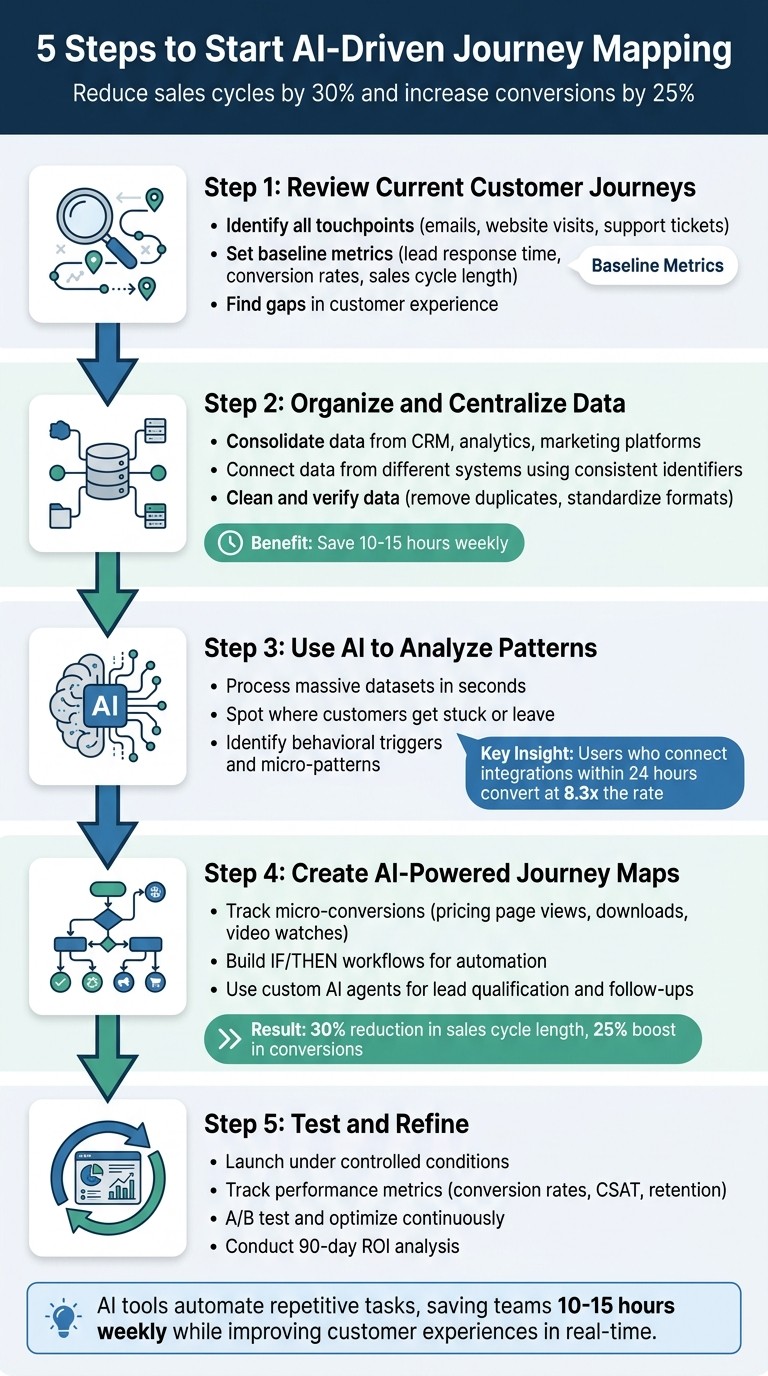
Review Current Customer Journeys: Identify touchpoints (emails, website visits, support tickets) and gaps in the customer experience.
Organise and Centralise Data: Consolidate customer data from various platforms into a single system to avoid fragmentation.
Use AI to Analyse Patterns: Leverage AI to detect trends, risks, and opportunities from structured and unstructured data.
Create AI-Powered Journey Maps: Build dynamic maps that adjust based on customer behaviour, focusing on micro-conversions and personalised pathways.
Test and Refine: Launch under controlled conditions, track metrics (e.g., conversion rates, retention), and continuously improve.
AI tools simplify complex processes, saving teams 10–15 hours weekly by automating repetitive tasks. Services like AgentimiseAI offer tailored workshops, training, and custom AI agent development to help SMEs implement these steps effectively.
5 Steps to Implement AI-Driven Journey Mapping for Business Growth
Step 1: Review Your Current Customer Journey
Take a close look at your current customer journey to understand real customer behaviour and identify any system issues or missing data. This is a crucial first step before introducing AI tools into the mix.
Start by setting baseline metrics for key performance indicators like lead response time, conversion rates, and the length of your sales cycle. These benchmarks help you gauge the impact of AI - whether it’s genuinely improving outcomes or just adding unnecessary complexity. Once you’ve established these metrics, map out every touchpoint in your customer journey to get a full picture of how customers interact with your business.
List All Customer Touchpoints
Make a record of every interaction your customers have with your brand. This includes digital touchpoints like website visits, email clicks, social media engagement, content downloads, and adverts. Don’t forget direct interactions too, such as sales calls, support tickets, and face-to-face meetings. Pay attention to behavioural signals, like visits to your pricing page or abandoned demo forms, as these can reveal a lot about customer intent.
In addition to quantitative data, gather qualitative insights. Pull information from online reviews (e.g., Google, Yelp), open-ended survey responses, and anonymised chat logs. Export a quarterly batch of this unstructured feedback for analysis. This is where AI shines - it can process large volumes of reviews and chats to uncover pain points that traditional methods might overlook. Collecting this data thoroughly is key to enabling AI to better understand and improve your customer journey.
Once you’ve documented these interactions, it’s time to identify where things are going wrong.
Find Gaps in Your Customer Experience
Use tools like your CRM and analytics software to pinpoint areas where customers face obstacles, drop off, or encounter issues. Look for friction points such as forms with high abandonment rates (e.g., 60%) or long dwell times on pages that indicate confusion. Keep an eye on checkout drop-offs and track smaller actions, like visits to an integrations page or downloads of a template, as these often indicate a successful journey is underway.
Check for disconnected systems that fragment customer data across multiple platforms, leaving no centralised source of truth. Also, identify any missing behavioural tracking for critical actions - like content downloads or support requests - that could hinder AI’s ability to create an accurate journey map. Use tools like session recordings, usability tests, and device audits to uncover platform-specific issues. A detailed analysis of these gaps ensures your AI tools have complete and reliable data to work with, setting the stage for more effective journey mapping.
Step 2: Gather and Organise Customer Data
Once you've mapped the customer journey and spotted any gaps, the next step is to bring all your customer data together. This means pulling information from every touchpoint - CRM systems, analytics tools, marketing platforms, customer support records, social media interactions, and product usage data.
The tricky part? These systems often don't communicate with each other. Without a unified approach, you'll end up with fragmented profiles scattered across platforms, which makes it tough for AI to detect meaningful trends. To avoid this, consolidate all your data into a single centralised location. Analysing data collectively, rather than in silos, is key to unlocking actionable insights. But that’s not all - connecting this data accurately is just as important.
Connect Data from Different Systems
Start by identifying consistent identifiers for your customers across all platforms. For instance, a single customer might have different IDs in your CRM, email marketing tool, and support platform. Using Master Data Management (MDM) practices can help link these disparate records, ensuring all interactions are tied to the right profile.
If you're using CRM-native AI tools, you're in luck - they can access real-time data without requiring complex migrations or manual syncing. This significantly reduces setup time, often cutting it from weeks to mere minutes. On the other hand, external tools that rely on exported data can quickly become outdated and require constant IT support to maintain integrations. A unified and up-to-date view of your data allows AI to uncover genuine behavioural patterns with ease.
Clean and Verify Your Data
For AI to deliver reliable insights, your data must be accurate and well-organised. This means taking the time to clean it up: remove duplicate records, standardise formats, and fill in any missing details. Establish clear data governance policies to manage ownership, retention schedules, and compliance with regulations like GDPR. Remember, poor-quality data leads to poor-quality insights, so focus on accuracy over sheer volume.
"Now we have a lot less data, but it's quality data. That change allows us to use AI confidently, without second-guessing the outputs." – Elizabeth Gerbel, CEO
Clean data doesn't just improve AI performance - it also streamlines workflows. For example, sales teams often save 10–15 hours a week once routine tasks like data entry and communication are automated, thanks to properly integrated systems. While upfront effort is required to organise and verify your data, the payoff is immediate: from day one, AI can start delivering reliable, actionable insights.
Step 3: Apply AI to Find Patterns in Your Data
Once your data is cleaned and centralised, AI can process massive datasets in seconds, revealing patterns that would be nearly impossible to spot manually. It goes beyond surface-level analysis, uncovering micro-patterns, behavioural triggers, and hidden links that explain customer actions.
Machine learning models are particularly adept at finding subtle sequences that indicate intent or risk. These insights help you focus on high-intent leads and address potential issues before customers disengage. Plus, AI can analyse unstructured data - like chat logs, reviews, and survey results - and turn it into clear, actionable themes that highlight friction points along the customer journey.
Spot Where Customers Get Stuck or Leave
AI keeps an eye on engagement signals, making it easier to identify where customers encounter obstacles or drop off entirely. Predictive models can flag warning signs like reduced activity, unresolved support tickets, or even subtle shifts in sentiment during interactions. For instance, if a user doesn’t invite a team member within their first week, this could indicate a risk of churn. By catching these signals early, you can step in with retention offers or assistance before it’s too late.
Cohort analysis adds another layer by comparing behaviours of high-value converters to those who didn’t convert. This helps uncover the specific actions that lead to success. For example, in the B2B SaaS world, users who connect a key integration - like Slack or Teams - within 24 hours of signing up convert at 8.3 times the rate of those who don’t. Similarly, customers who watch three or more tutorial videos within 48 hours of signing up (a behaviour dubbed "Binge Learning") are 6.7 times more likely to convert. These insights allow you to make data-driven adjustments to improve the customer journey.
While some AI tools focus on identifying friction points, others highlight what keeps customers engaged and satisfied.
Learn What Customers Want and How They Behave
AI doesn’t just spot problems - it also shows you what keeps your customers happy and loyal. By clustering data from reviews or support chats, AI can identify common pain points and delights at every stage of the customer journey. Often, this analysis is backed by direct customer quotes, giving you a clear sense of what’s working well and what needs attention - without the need to sift through endless feedback manually.
Predictive models also help you anticipate what customers want next. They can forecast upgrade likelihood, product preferences, and even the best timing for engagement. This means you can personalise interactions in real time, basing your approach on actual customer behaviour rather than relying on broad assumptions. It’s a smarter way to connect with your audience and meet their needs.
Step 4: Build Your AI-Powered Journey Maps
Now that you've identified patterns and pinpointed friction in the customer experience, it's time to create journey maps that reflect actual customer behaviour - not just what you imagine it to be. Unlike traditional, static maps, AI-powered journey maps adapt in real time based on how customers interact with your business at every touchpoint, from their first visit to your website to making repeat purchases. By tapping into the micro-patterns you've uncovered, these maps can provide a more accurate representation of each customer's unique path.
One key tactic is tracking micro-conversions - small but meaningful actions like viewing a pricing page, downloading a template, or watching an onboarding video. These micro-conversions act as signals of progress through the customer journey. For instance, data might reveal that customers who return to your site within four hours are 82% likely to convert, compared to just 18% for those who return after 48 hours. This "return velocity" metric can trigger automated actions, such as sending a personalised email or offering a quick-start guide to keep them engaged.
AI also allows you to move beyond broad customer segments and craft unique pathways for individuals. Predictive scoring is one example: it assigns a real-time score (from 0 to 100) to each lead based on their behaviour. This helps your sales team focus on high-intent prospects, while automated nurture sequences engage others. For example, you might create an "Integration-First" pathway that prioritises onboarding steps and drives conversions more effectively.
Map Each Stage from First Contact to Repeat Customer
Once you've identified behavioural patterns, you can define each stage of the customer lifecycle, creating a clear progression from discovery to retention. AI tools can even cluster qualitative feedback, ensuring that each stage reflects how customers actually speak about their experiences, rather than internal jargon. This approach helps you uncover areas where customers face friction - and where your strengths shine.
To make the process actionable, build IF/THEN workflows. For example, if a trial user hasn’t engaged with your product within 24 hours, you could trigger an automated guide to re-engage them. Businesses that use AI for sales automation have reported impressive results, such as a 30% reduction in the length of sales cycles and a 25% boost in conversions.
Use Custom AI Agents Built for Your Business
Once your journey map is complete, it's time to integrate automation for smooth execution. Custom AI agents can handle complex tasks along the customer journey, freeing up your team for higher-value activities. These agents can perform a variety of tasks, such as calling new leads, qualifying buyers, scheduling meetings for your sales team, and updating your CRM. By integrating directly with your CRM, these agents use real-time data to make precise predictions and ensure seamless transitions between automated and human interactions.
AgentimiseAI offers custom AI agent development starting at £1,900. These agents are tailored to fit your existing tools and workflows, whether you need help qualifying leads, automating follow-ups, or managing pipeline updates. By offloading routine tasks to AI, your sales team can save 10–15 hours per week, giving them more time to focus on strategic conversations and closing deals.
Step 5: Launch, Test, and Improve Your Journey Maps
Once your AI journey maps are ready, it’s time to launch them, test their effectiveness, and refine them based on real-world feedback. Start under controlled conditions and iterate as you gather insights. Before going live, ensure you’ve established clear data permissions and quality assurance procedures. A pilot scorecard can help track early success - like aiming for a 20% reduction in cycle time without increasing customer-facing errors. This step is all about turning your insights into actionable strategies.
Automate Customer Touchpoints and Run Tests
Begin by automating repetitive interactions such as lead qualification, follow-ups, and meeting scheduling. Use A/B testing to fine-tune these processes and validate your journey optimisations. Frame each test as a hypothesis. For example: "If AI can improve forecasting accuracy by 15%, how will it affect profit margins?"
During the initial rollout, maintain a human-in-the-loop process to ensure quality control and build trust in the system. Use insights from these pilot tests to create a playbook. This document should include standard prompts, escalation paths, and exception-handling procedures to maintain consistency and make it easier to scale successful strategies.
Track Performance Metrics
Keep a close eye on financial, operational, and customer-focused metrics to measure success. Financial metrics might include revenue per customer, margin contribution, or lead-to-cash timelines. Operational efficiency can be tracked through metrics like sales cycle length, administrative hours saved, or forecast accuracy. For customer-centric results, monitor conversion rates, customer satisfaction (CSAT) scores, and retention rates.
Set up real-time dashboards and automated alerts to detect shifts in journey patterns, allowing you to respond quickly. Use SMART goals (Specific, Measurable, Achievable, Relevant, Time-bound) to turn raw data into actionable KPIs. For example, instead of just tracking bounce rates, aim for a goal like: "Increase conversion rates by 1% by Q2." After 90 days, conduct a return-on-investment (ROI) analysis to determine whether the pilot is delivering measurable value before expanding further.
Focus on Changes That Deliver Results
Using your test findings and performance metrics, prioritise adjustments that offer the most value. Identify high-ROI opportunities early to maximise impact. AgentimiseAI’s AI Discovery Workshops (£1,050) can help you pinpoint which AI improvements will provide the greatest benefits for your business. These in-person sessions deliver practical recommendations tailored to your existing tools and workflows, ensuring your resources are directed where they’ll make the biggest difference.
AgentimiseAI Services Comparison
With your AI journey maps validated, it's time to choose the right AgentimiseAI service to match your strategy. Whether you're just starting to explore AI or are ready to implement solutions, selecting the right service ensures your journey is supported by the tools and expertise you need.
Training, Workshops, and Custom Development Options
For teams that are curious about AI but unsure where to start, the AI Leadership Training (£1,050) offers a half-day session designed to build confidence without overwhelming technical jargon. It accommodates up to 10 team members, teaching them how to use AI safely and effectively, while also addressing potential internal resistance. Henry Green, MD at David Cover & Son Ltd, shared his experience:
"It's been an absolute pleasure beginning our AI journey with Agentimise. They introduced us to AI with such finesse, making AI's potential truly exciting for Covers."
If your business sees AI’s potential but lacks a clear plan, the AI Discovery Workshop (£1,050) is ideal. This half-day, in-person session audits your workflows and identifies automation opportunities with the highest return on investment. The result? A prioritised roadmap to guide your AI initiatives before you commit to development.
For companies ready to automate a specific, repetitive process, such as client onboarding or data management, Custom AI Agent Development is the next step. Pricing starts at £1,900 for small agents (1–2 integrations), £2,400 for medium agents (multi-system integrations), and £3,100 for large, complex workflows. Each agent also incurs a £500 validation and design fee.
The Bundle Offer combines Training and Discovery into a single day for £1,800, saving you £300 (15%). This option is perfect for SMEs eager to transition quickly from learning to actionable strategy.
Service | Price | Best For | Outcome |
|---|---|---|---|
AI Leadership Training | £1,050 | Teams new to AI | Practical skills and confidence |
AI Discovery Workshop | £1,050 | Planning-stage SMEs | Prioritised automation roadmap |
Custom AI Agent Development | From £1,900 | Implementation-ready businesses | Live, integrated AI agent |
Bundle (Training + Workshop) | £1,800 | Comprehensive readiness | Combined education and strategy |
Conclusion
AI-driven mapping is transforming how SMEs engage with their customers, moving beyond static PDFs to dynamic systems that adapt to real-time behaviours. By following a clear process - assessing your current journey, organising your data, leveraging AI to uncover patterns, creating intelligent maps, and refining through continuous testing - you can build systems that truly respond to customer needs.
The results speak for themselves: companies using AI for sales automation report up to a 30% reduction in sales cycle length and a 25% boost in conversions, along with saving 10–15 hours a week on routine tasks. These are not just numbers - they represent meaningful changes in efficiency and outcomes.
AgentimiseAI offers tailored services to help SMEs navigate this shift. Whether it's gaining insights through AI Leadership Training, exploring potential high-impact areas in a Discovery Workshop, or integrating Custom AI Agents into your workflows, their solutions bridge the gap between understanding AI and putting it to work. This structured approach ensures that AI isn't just a concept but a practical tool addressing real challenges.
As customer expectations continue to evolve, AI-powered mapping equips your business to stay ahead by adapting to real-time insights. The real question is no longer if you should adopt AI, but how quickly you can move from planning to implementation.
FAQs
What data do I need before using AI journey mapping?
Before diving into AI journey mapping, it’s crucial to have your data in order. This means making sure it’s clean, easy to access, and organised. Here’s what to focus on:
Eliminating errors and inconsistencies: Clean up your data to ensure accuracy.
Structuring for accessibility: Arrange data so it’s simple to retrieve and analyse.
Gathering insights from key touchpoints: Collect data from customer interactions across all relevant channels.
These steps lay the groundwork for AI to effectively track, analyse, and refine customer journeys in real time.
How do I connect customer records across different systems?
AI-powered integration tools make it easier to bring together customer data from multiple systems. These platforms can securely connect to sources like CRM systems, web analytics tools, and customer support platforms, often using APIs or integration hubs.
They handle tasks like merging duplicate records, standardising data formats, and creating unified customer profiles. The result? A real-time, comprehensive view of customer interactions across all touchpoints. This ensures your data stays consistent and up to date, making it much simpler to map customer journeys and deliver personalised experiences.
How can I measure ROI from AI-driven journey mapping?
To evaluate the return on investment (ROI) of AI-driven journey mapping, follow these steps:
Set Baselines: Start by documenting your current metrics, such as customer satisfaction scores, conversion rates, or retention figures. These will serve as reference points to measure progress.
Track Costs and Benefits: Keep a detailed record of all expenses, including software, training, and implementation costs. At the same time, quantify the benefits, like increased customer retention, higher sales, or improved operational efficiency.
Use the ROI Formula: Calculate ROI using this formula:
ROI = ((Net Benefits – Total Costs) / Total Costs) × 100%.
This will give you a clear percentage showing the effectiveness of the investment.
Make it a habit to review these metrics regularly to ensure your efforts are delivering the expected value.