
Common Workflow Mapping Mistakes with AI
20 Apr 2026
Avoid AI workflow failures: analyse processes, align data, simplify workflows, involve staff, set clear metrics and keep human oversight.

AI can transform businesses, but 70% to 85% of AI projects fail due to poor preparation. The issue? Rushing into automation without understanding workflows. This leads to wasted investments, amplified inefficiencies, and frustrated teams.
Here’s what typically goes wrong and how to fix it:
Skipping Process Analysis: Automating flawed processes only speeds up errors.
Data Misalignment: Inconsistent fields across systems cause silent failures.
Overcomplicating Workflows: Complex designs confuse teams and break easily.
Ignoring Frontline Input: Overlooking real work methods results in unrealistic automation.
Lack of Clear Goals: Without measurable targets, efforts focus on the wrong tasks.
Assuming AI is Perfect: AI’s variability demands human oversight.
Key takeaway: Success with AI depends on proper groundwork - analyse workflows, validate data, simplify processes, involve your team, set measurable goals, and keep humans in the loop. Companies that prepare thoroughly see twice the ROI compared to those that don't. Don’t automate chaos; fix it first.
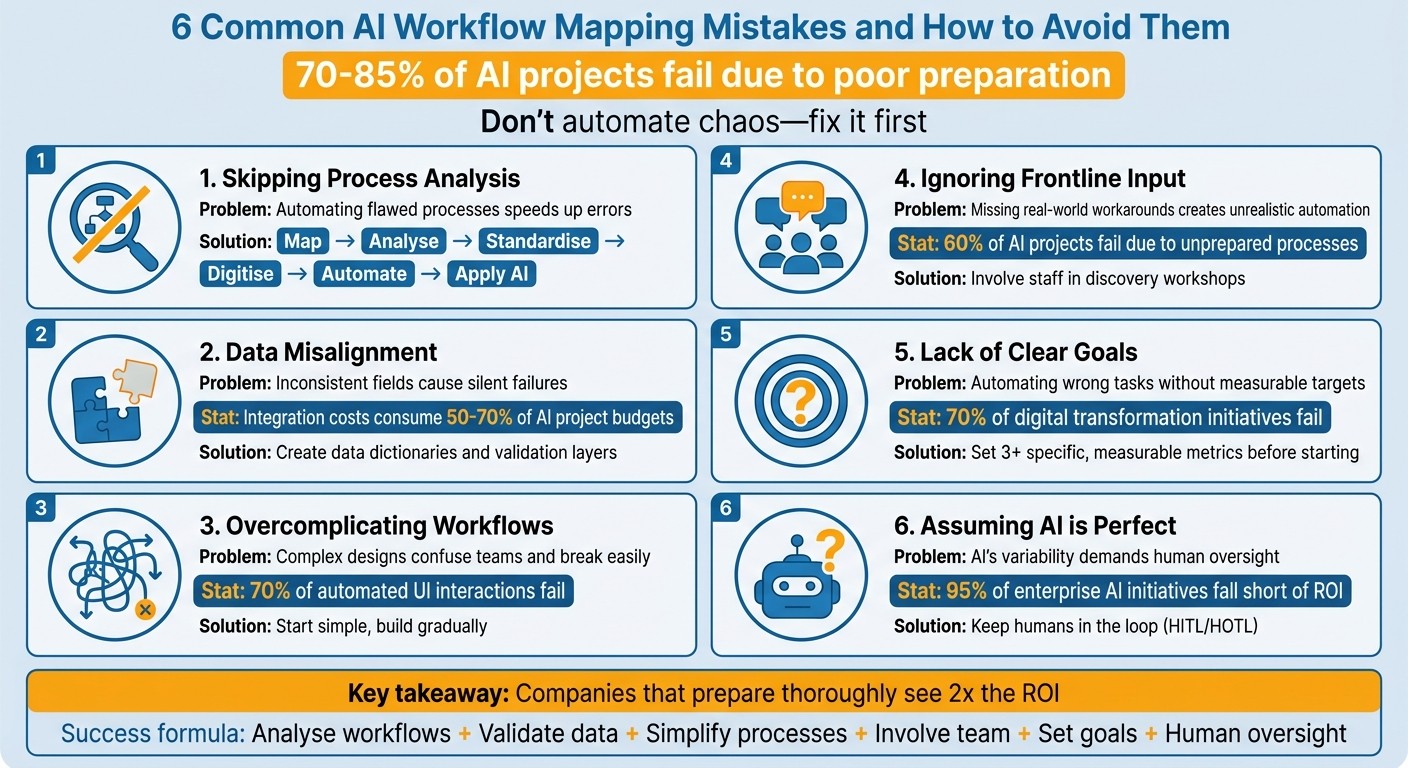
6 Common AI Workflow Mapping Mistakes and How to Avoid Them
Mistake 1: Mapping Workflows Before Analysing Them
One of the most common errors UK businesses make with AI workflow mapping is diving straight into automation without fully understanding the processes they’re trying to automate. Rushing into automation without proper groundwork often amplifies existing problems instead of solving them.
Why Automating Broken Processes Backfires
AI doesn’t fix broken processes - it amplifies them. If there are inefficiencies, errors, or undocumented workarounds in your current workflow, AI will replicate those issues at machine speed.
"The AI just made our existing mess faster."
For example, a company invested heavily in automating its order processing system without first analysing how the process actually worked. The result? Employees spent more time correcting AI-generated errors than they had on manual processing. The project was eventually abandoned.
Skipping analysis leads to predictable problems. AI trained on historical data will inherit and repeat past errors. Manual data entry alone often has an error rate of 1% to 3%. When AI scales these errors, they can create a "permanent correction backlog", where employees are constantly fixing predictable mistakes.
There’s also the risk of automating the wrong task. Many businesses focus on automating the most visible or straightforward steps - like drafting a document that takes eight hours - while ignoring the real bottlenecks, such as a seven-day manual review process. The result? No meaningful reduction in overall cycle time, even though the technology functions as intended.
Without a clear understanding of your current workflows, automation risks scaling inefficiencies instead of solving them.
Solution: Analyse Your Process Before Automating
To avoid these pitfalls, start with a rigorous analysis of your existing workflows. Document what actually happens - not what outdated procedures say should happen. This includes every informal workaround, exception, and piece of "tribal knowledge" that exists only in the minds of your team members.
Encourage employees to record their real work steps, capturing hidden processes that may not appear in formal documentation. Conduct discovery workshops with the people directly involved in the work - not just managers. These sessions can uncover critical details about informal practices that keep operations running.
Focus on identifying key bottlenecks, common errors (like frequent manual data entry mistakes), and dependencies (such as delays caused by approvals or external systems). Measure each step in terms of time, error rates, and costs. This analysis helps pinpoint where AI can genuinely add value, creating a solid foundation for improvement.
Businesses that take the time to redesign their processes before automating see much better results. They achieve three times the ROI compared to those who skip this step and are 43% more likely to realise productivity gains within the first year. The proven approach is simple: Map → Analyse → Standardise → Digitise → Automate → Apply AI. Skipping any step in this sequence increases the likelihood of failure, as evidenced by the 70% to 85% failure rate of rushed AI projects.
Mistake 2: Misaligned Data Fields
Once you've analysed your processes, the next step is all about getting your data aligned. When systems don’t "speak the same language", AI workflows can fall apart. For example, one system might label a field as cust_ID, while another calls it client_id. It seems minor, but these small inconsistencies can cause silent failures that are tough to spot and costly to fix.
What Happens When Data Doesn't Match
Misaligned data fields lead to three major issues:
Incompatible data types: Imagine trying to map a text string to a date field - this can crash workflows or cause data to be omitted entirely.
Semantic misalignment: Similar field names might mean different things. For instance, Jira might use "To Do/Done" for task statuses, while ServiceNow tracks priorities with "I/II/III." AI could treat these as equivalent, leading to flawed outputs.
Ignoring system constraints: A 500-character field in one system might get cut off at 255 characters in another, breaking relationships and losing important details.
These problems can snowball quickly. Manual data entry already has an error rate of 1% to 3%. When AI processes this data at scale, it doesn’t just repeat the errors - it multiplies them across thousands of records. In fact, integration costs often eat up 50% to 70% of an AI project’s budget, much of which goes towards fixing these preventable alignment issues.
"Garbage DAG in, garbage intelligence out." - rokoss21, AI Systems Architect & Tooling Engineer
Solution: Validate Your Data Before Mapping
To avoid these pitfalls, start by creating a data dictionary - a comprehensive guide that documents every field name, data type, transformation rule, and constraint across your systems. This becomes your go-to reference, cutting out guesswork during implementation.
Before you build any workflows, use a data explorer to list all fields and their types across your connected systems. Look for mismatched types, inconsistent naming, or fields with similar labels but different meanings. Add a validation layer between systems to standardise formats (e.g., converting all dates to YYYY-MM-DD), enforce required fields, and apply business rules. Testing is crucial - never test mappings in your live environment. Use a sandbox with synthetic or anonymised data to simulate scenarios and spot issues like truncation, null-handling problems, or misaligned semantics before they affect real operations.
Companies that prioritise data validation and standardisation are twice as likely to exceed ROI expectations compared to those who skip this step. The bottom line: AI is only as good as the data it’s trained on. Clean, consistent inputs are essential for seamless and reliable AI workflows.
Mistake 3: Making Workflows Too Complex
Once your data is validated, the next trap to avoid is creating workflows that are unnecessarily complicated. Trying to account for every possible exception, edge case, or "what if" scenario can result in a system that's fragile and hard for anyone to navigate.
Why Complex Workflows Don’t Work
Over-complicated workflows can derail adoption. If your team can’t easily sketch out the entire process without getting confused, it’s a clear sign that the workflow is too convoluted. When workflows are overly fragmented, they often fail.
This issue becomes even worse when you digitise a flawed manual process. Instead of resolving inefficiencies, AI can amplify existing problems at scale. For instance, automating a chaotic order processing system without first streamlining it can lead to more errors. Staff may end up spending more time fixing AI mistakes than they did on the original manual process.
The probabilistic nature of large language models (LLMs) adds another layer of complexity. These models can produce slightly different outputs for the same input, which makes rigid, multi-step workflows vulnerable if even one step doesn’t go as planned. To make matters worse, 70% of automated UI interactions fail due to changes in interface elements. This creates what some in the industry call "forever projects" - systems that never stabilise and require constant engineering fixes.
Solution: Start Simple and Build Gradually
The answer lies in simplicity. Begin by documenting the real-world process, not just the official version. Capture what actually happens, including any informal shortcuts or workarounds. Then, strip away unnecessary steps and consolidate data entry points. Companies that streamline workflows before introducing AI are twice as likely to exceed ROI expectations and three times as likely to achieve meaningful business results.
Focus on one high-impact workflow to start - a process that’s frequent, time-intensive, and has clear, measurable outcomes. Prioritise workflows based on how often they occur, how much time they consume, and their overall impact on the team. Build a simple version, test it with real users, and refine it based on their feedback. Make sure to establish clear escalation rules so the AI knows when to pass tasks to a human. By following this diagnose-design-automate approach, you’ll avoid digitising chaos and lay the groundwork for smoother workflow improvements down the line.
Mistake 4: Ignoring the People Who Do the Work
After streamlining your workflow, the next big blunder is designing it without involving the people who actually carry out the tasks. When leadership or outside consultants create process maps in isolation, they usually base them on the official version - the one buried in outdated manuals or ticketing systems. What they overlook is the reality: the hidden Excel sheets, Slack approval threads, and unwritten knowledge that keep things running smoothly. Just like with poorly analysed or overly complex workflows, skipping input from the people on the ground leads to flawed results. Once you've embraced simplified, data-driven mapping, the next logical step is addressing the human factor.
Why Your Team’s Input Matters
Most processes live in fragments - scattered instructions, improvised shortcuts, and informal solutions that never make it into official procedures. Employees often rely on tools like personal spreadsheets, handwritten notes, or unofficial communication channels to manage exceptions that the official system can’t handle. Barbara Roos, Founder of Trailhead Communications, sums it up perfectly:
"Process knowledge is human and contextual, often eluding standard documentation."
When you leave out the people actually doing the work, you’re mapping a fantasy. Pavan Madduri, Senior Platform Engineer at Grainger, explains the risk:
"If an AI agent is trained purely by observing the official workflow in the ticketing platform, it's learning a fantasy."
The fallout? Teams already sceptical of manual processes will lose trust in an AI-driven version even faster - especially when it churns out incorrect results. Data backs this up: 60% of AI projects fail because the underlying data and processes weren’t prepared for AI. This echoes the issues highlighted in Mistake 1, where automating without proper groundwork only makes problems worse.
Solution: Get Your Team Involved from the Start
To close these gaps, the answer is simple: bring frontline staff into the process from day one. Host process discovery workshops with the people who actually perform the tasks - not just their managers. Keep these sessions short and focused, ideally 2–3 hours, with no more than ten participants. Use tangible tools like Post-it notes and markers to uncover the hidden steps and workarounds. The goal is to map the "as-is" process, including all the messy details and unofficial detours.
Directly engage subject matter experts and clearly explain how the AI project will benefit them, not just the organisation. Address concerns openly before the project kicks off. If your team describes a twelve-step process while the AI identifies only five, trust your team. The map must reflect reality, not an idealised version. Before rolling out the system, collaborate with your staff to establish clear escalation paths - what happens when the AI hits a roadblock? Setting up these human fallback mechanisms early on builds the trust needed for long-term success.
Mistake 5: No Clear Goals or Measurements
After ensuring your team is actively involved, the next step is just as crucial: setting clear objectives. Skipping this part often leads to businesses automating processes without a clear sense of purpose. The result? They end up focusing on the wrong tasks - automating whatever process is first documented instead of identifying the one that truly needs improvement. Without measurable baselines like cycle times, error rates, or capacity utilisation, you're essentially operating on guesswork.
Donald La, Growth at Fluency, puts it plainly:
"Without visibility, transformation is guessing. You pick something to automate and hope it works."
This lack of focus can lead to bigger operational problems down the line.
The Problem with Unclear Objectives
When goals aren't specific, you risk automating processes that don't actually matter. Imagine reducing a drafting task from eight to three hours, only to realise that a seven-day manual review is the real bottleneck. You might speed up an insignificant step while leaving the larger issue untouched - or worse, you could end up amplifying inefficiencies. For instance, automating a poorly designed finance process once caused a company’s cycle times to increase by 18% and introduced more errors, even though the automation itself functioned as intended.
The statistics back this up: 70% of digital transformation initiatives fail, often because businesses target the wrong workflows. By 2025, 42% of companies had abandoned most of their AI projects, a sharp rise from 17% the year before. Another risk is process drift, where automated workflows bypass essential checks like approvals or audits, leading to compliance issues over time.
The lesson here? Clear, measurable benchmarks are essential to avoid these pitfalls.
Solution: Define Specific, Measurable Targets
Before diving into AI workflow mapping, take the time to establish a baseline. Measure current cycle times, error rates, and capacity utilisation - not just theoretical averages, but actual performance data. Use a simple formula - Frequency × Time per Instance × People Affected - to identify which workflows will have the most impact. This approach ensures you focus on meaningful processes rather than flashy but low-priority tasks.
Set at least three core metrics from the start, such as response time, resolution rate, and administrative hours saved. Be precise with your objectives. For example, instead of vaguely aiming to "speed up approvals", set a goal like "reduce approval steps from five to three and cut cycle time from seven days to 48 hours." Similarly, replace a general aim to "improve accuracy" with a concrete target like "keep error rates below 3%."
Finally, consider setting confidence thresholds. This allows the AI to escalate tasks to a human when necessary, rather than striving for complete autonomy. Realistic, well-defined goals are always more effective than overly ambitious promises that set you up for failure.
Mistake 6: Treating AI as Perfect
After delving into data and process-related missteps, there's another major error that businesses often make: assuming AI is flawless. Many organisations treat AI like traditional software, expecting consistent outputs from identical inputs. However, AI operates on probabilities, not fixed rules. This means the same prompt can lead to different outcomes, which can disrupt rigid automation workflows.
Why AI Outputs Can Be Unpredictable
AI generates results based on patterns in its training data, making its responses inherently variable. For example, during a test involving 100 items, an AI system optimised constraints but overlooked 32 items because it wasn’t programmed to check for completeness. The system didn't flag the oversight since it wasn’t explicitly instructed to do so.
This variability can snowball in multi-step workflows. An error at the start of a process can cascade, leading to further mistakes in subsequent steps. The numbers paint a stark picture: between 70% and 85% of AI projects fail to meet expectations, and nearly 95% of enterprise AI initiatives fall short of delivering measurable returns. AI lacks what experts call a "smell test" - it doesn’t inherently recognise when an outcome is illogical or incomplete unless explicitly programmed to do so.
This unpredictability highlights the importance of maintaining oversight.
Solution: Keep Humans in the Loop
The solution isn’t to discard AI but to design systems that account for its limitations. Introducing human checkpoints at critical stages is key, especially for decisions that are external, financial, or customer-facing. Confidence thresholds can help flag tasks for human review when the AI’s certainty drops below a set level. This approach is known as Human-in-the-Loop (HITL), where human approval is required before actions are taken. Alternatively, Human-on-the-Loop (HOTL) involves monitoring AI outputs post-action with the ability to step in if needed.
A practical framework to consider is "Explain, Guide, Execute". When AI encounters uncertainty, it should explain its reasoning or guide users through the process instead of fully automating tasks. Let AI handle repetitive, low-risk jobs, but ensure human oversight for more complex or critical areas. Sophie Kazandjian, Digital Ops Partner, sums it up well:
"AI is brilliant at speed and scale, but it does not do common-sense validation or stakeholder context by default."
To avoid errors spreading through workflows, implement validation steps between AI outputs and subsequent actions. Data validation can catch and reject malformed responses before they cause issues. In mature workflows, human intervention is typically needed for only 5% to 15% of agent actions, with the rest handled automatically. This balance allows organisations to harness AI’s efficiency while maintaining reliability and control.
How AgentimiseAI Helps You Avoid These Mistakes
The challenges outlined earlier aren’t just hypothetical - they’re recurring issues we’ve observed in UK SMEs and mid-market businesses. AgentimiseAI’s services are specifically designed to help you avoid these common pitfalls. Instead of rushing into automation, we focus on understanding how your business actually operates - beyond what’s written in the org chart.
AI Discovery Workshops for Better Workflow Mapping
Our AI Discovery Workshops (£1,050) are half-day sessions aimed at uncovering the informal workflows your team relies on daily. These are the shortcuts and workarounds that rarely make it into official documentation but are critical to how things really get done. Importantly, we work directly with the people doing the work, not just managers, to identify these hidden processes.
We use a simple formula to prioritise automation opportunities: frequency × time per instance × people affected. For example, a task that takes three minutes but occurs 200 times a month across five team members adds up to 50 hours of potential savings. These workshops also highlight "data dark spots" - areas where decisions are made without structured data - ensuring AI has a solid foundation to learn from. Research shows companies that redesign workflows before implementing AI are twice as likely to exceed ROI expectations compared to those who automate without proper planning. This approach ensures precise automation and ties directly back to the need for clearly defined processes.
AI Leadership Training for Non-Technical Teams
To build a strong foundation for AI, we also offer AI Leadership Training (£1,050). These half-day sessions, designed for up to 10 participants, teach teams to adopt a "process-first" mindset. The training follows a clear sequence: Map, Analyse, Standardise, Digitise, and then Automate. This prevents the costly error of automating flawed processes.
The sessions help leadership teams set realistic ROI expectations and recognise when AI isn’t the right solution. Considering that 60% of AI projects are abandoned due to unprepared data and processes, this alignment is essential. As Henry Green, Managing Director at David Cover & Son Ltd, remarked:
"It's been an absolute pleasure beginning our AI journey with Agentimise. They introduced us to AI with such finesse, making AI's potential truly exciting for Covers."
For a complete solution, you can bundle the Leadership Training with a Discovery Workshop for £1,800, saving £300. This combination provides both the knowledge and the roadmap to move forward confidently.
Custom AI Agent Development for Your Business
Once workflows are mapped and evaluated, our Custom AI Agent Development (starting at £1,900) creates agents tailored to your business. Before development, we provide a prioritised list of potential agents, including estimated time and cost savings, ensuring your investment focuses on high-impact areas. This ROI-driven approach is crucial when inefficiencies can drain 20%–30% of annual revenue.
We design agents with clear escalation paths and human oversight where it’s most important - addressing the lack of accountability that often leads to AI project failures. Each agent is assigned both a business owner (for outcomes) and a technical owner (for data and prompts). This structured approach helps avoid the 80% failure rate seen in AI initiatives, which is double that of traditional tech projects.
Conclusion: Getting AI Workflow Mapping Right
Skipping the groundwork almost guarantees failure in AI workflow mapping. The most common mistakes all share one theme: rushing into automation without the right preparation.
To get it right, focus on these essentials: map out your current processes, validate your data, streamline workflows, involve your team, set clear and measurable goals, and always keep human oversight in the mix. Research shows that companies who take the time to redesign their workflows before introducing AI are twice as likely to exceed their ROI expectations compared to those who dive straight into automation.
As the saying goes:
"Automation doesn't fix a bad process. It runs the bad process faster and at higher volume."
Automiq AI
AgentimiseAI’s process-first approach is designed to help you avoid these pitfalls. Their Discovery Workshops reveal the informal workarounds your team depends on, Leadership Training establishes a consistent methodology, and Custom AI Agent Development ensures the technology fits your real workflows - not some idealised version. This holistic approach ensures AI delivers real, measurable progress instead of amplifying inefficiencies.
Success with AI workflow mapping isn’t about having the most advanced tech. It’s about understanding your processes, organising your data, and engaging your team. With the right preparation, AI shifts from being a gamble to becoming a dependable tool that delivers measurable results.
FAQs
How do I choose the first workflow to automate with AI?
To choose the first workflow to automate using AI, look for processes that offer strong return on investment (ROI). Focus on tasks that are frequent, repetitive, and moderately complex - steer clear of those that are overly detailed or unpredictable.
Take the time to map out the workflow in detail. Clearly document all participants, inputs, and decision points to avoid confusion and reduce potential risks. It's best to skip low-volume or highly variable tasks at the start. Instead, pick a process with clear accountability and measurable results to ensure a successful launch.
What data checks should I do before connecting systems?
Before setting up AI workflow automation systems, it's crucial to prioritise data quality, consistency, and completeness. Double-check that the data formats align with the requirements of the systems you're integrating. This helps reduce the risk of errors and ensures the connection process runs smoothly.
Where should humans review or approve AI outputs?
Humans must step in to review AI outputs at key decision points, particularly in situations where errors could compromise compliance or reliability. This allows for human judgement to play a crucial role in verifying or adjusting AI-generated decisions when needed.