How AI Tracks Team Performance in Real Time
19 Jan 2026
How AI links with workplace tools to give real-time team insights, predict bottlenecks and burnout, and protect privacy under UK data rules.
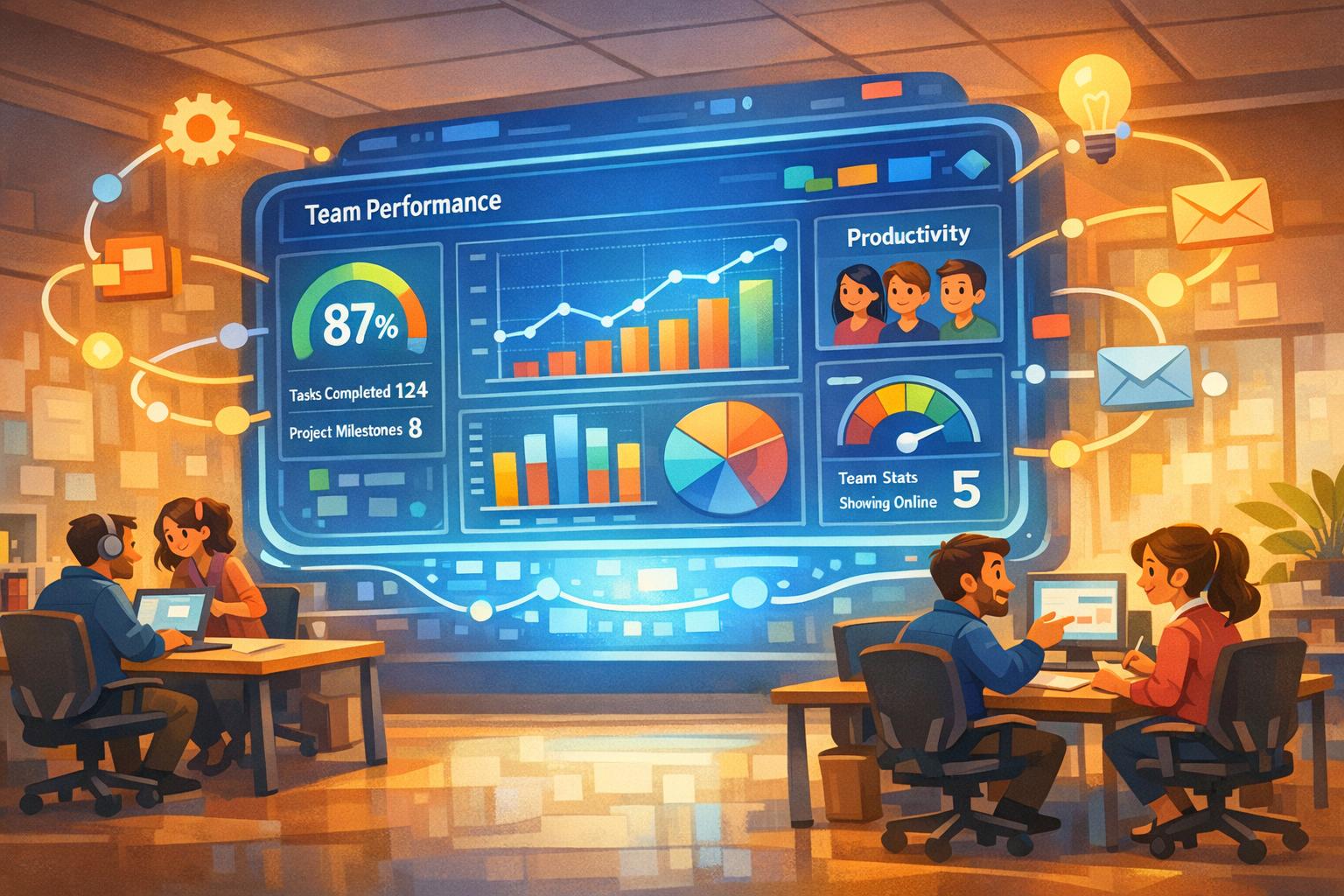
AI is transforming how businesses monitor team performance, replacing outdated annual reviews with real-time insights. Here's why it matters and how it works:
Real-Time Feedback: Continuous monitoring allows managers to address issues like burnout or inefficiencies as they happen, improving engagement and productivity.
Automation: AI tools integrate with platforms like Slack, Outlook, and Jira, analysing data from communication logs, task updates, and meetings to provide actionable insights without manual effort.
Key Metrics: AI tracks collaboration, workload balance, and skill gaps, helping businesses improve communication, allocate resources effectively, and identify training needs.
Predictive Capabilities: By analysing historical and current data, AI predicts delays, bottlenecks, or burnout risks, enabling proactive management.
Privacy and Compliance: Tools focus on team-level trends, not intrusive monitoring, while adhering to GDPR and data protection laws.
This shift empowers teams to stay aligned with goals, reduces low-value work, and ensures timely interventions - all while respecting privacy.
Key AI Performance Tracking Statistics and Benefits for UK Businesses
How AI Tools Track Performance in Real Time
Data Collection and Analysis
AI performance tools seamlessly integrate with platforms like Slack, Microsoft Teams, Jira, Asana, Trello, and Outlook to gather insights into how work unfolds across teams. By pulling data from communication logs, calendar events, task updates, and meeting notes, these tools build a comprehensive view of workplace activity.
The collected data spans several areas: time logs that capture task start and end times, activity levels monitoring app and website usage, meeting notes recording key discussions, and feedback signals from team interactions. Machine learning algorithms ensure this data is cleaned and standardised from over 25 collaboration tools, while natural language processing (NLP) transforms unstructured inputs - like emails and meeting transcripts - into actionable, structured data.
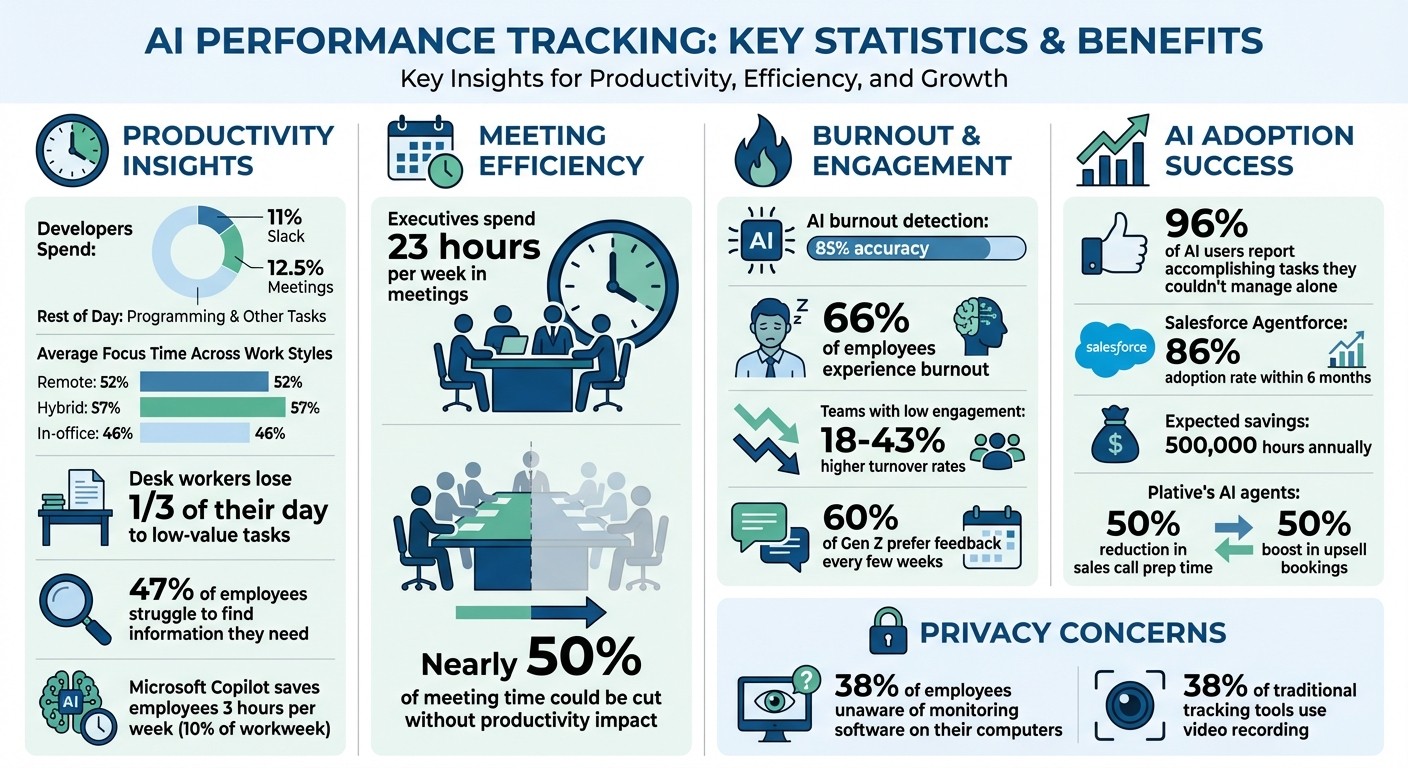
AI further organises work into three categories: core tasks (deliverables), non-core tasks (administrative work like emails), and unproductive time (distractions or frequent task-switching). For example, developers typically spend 11% of their day on Slack and 12.5% in meetings, contributing to a "Workday Intensity" metric that highlights the digital workload. With this refined dataset, teams can pinpoint process inefficiencies and detect patterns more precisely.
Identifying Bottlenecks and Trends
Once the data is unified, AI doesn’t just look back at past activities - it predicts future challenges. By comparing historical project data with current activity, predictive analytics can flag potential delays, resource imbalances, or budget concerns before they escalate. This predictive capability has been likened to "weather forecasting" for projects.
Burnout detection models, for instance, analyse patterns like weekend work, sudden spikes in activity, or prolonged idle time, achieving an impressive 85% accuracy in identifying risks.
"Finally, analytics that don't just tell me what happened, but what to do next. The predictive suggestions were a true breakthrough for our work processes." - Carlos V., IT Director, Healthcare
Real-time dashboards offer another layer of insight, helping managers spot when team members are overburdened or underutilised. This allows for quick task redistribution to maintain balance. Across all work styles, the average focus time remains relatively low - just 53% of the workday (remote: 52%, hybrid: 57%, in-office: 46%).
Key Metrics Monitored by AI for Real-Time Insights
Collaboration and Communication Effectiveness
AI keeps a close eye on how effectively teams communicate and collaborate. For instance, it analyses meeting efficiency, communication habits, and how well different departments work together. Did you know that executives spend an average of 23 hours each week in meetings? Shockingly, nearly half of that time could be cut without any impact on productivity. AI uses tools like automated surveys and calendar analytics to evaluate meeting frequency, duration, and overall value, helping to identify areas where time is being wasted.
Platforms like Slack and Microsoft Teams also play a big role by providing metrics on message frequency, response times, and how much time is spent on focused work versus interruptions. AI dives deeper into these patterns, examining how departments interact. It flags potential silos or highlights strong collaboration pathways. Roxanne Laczo, Head of People Analytics at Cloudflare, touches on this:
"If I could measure just one thing, it would be Manager Effectiveness. Worklytics offers a unique, data-driven approach to assessing how top managers interact with their teams and networks to drive performance".
AI also evaluates manager performance by monitoring the quality and frequency of 1:1 check-ins, coaching, and feedback cycles. Through sentiment analysis, it gauges employee engagement and team morale by examining communication data. This is particularly valuable for younger employees, like Gen Z, 60% of whom prefer feedback every few weeks. By offering ongoing insights, AI helps managers stay in tune with their teams without overloading them with formal reviews. Beyond communication, AI assesses project workflows to ensure resources are allocated effectively and delays are avoided.
Project Progress and Resource Allocation
AI keeps projects on track by monitoring task cycle times and the intervals between task handoffs, quickly identifying delays that need managerial attention. For example, if one task is completed but the next step isn’t picked up promptly, AI flags the issue to prevent bottlenecks.
Another key focus is workload balancing. AI calculates real-time utilisation rates to identify team members who are overworked or underutilised, suggesting ways to redistribute tasks. This not only prevents burnout but also ensures resources are being used efficiently. Predictive risk analysis adds another layer of insight, comparing past project data with current activity to forecast potential delays, bottlenecks, or even budget overspending.
Skill-based task matching is another area where AI excels. By analysing task requirements and matching them with the most qualified individuals based on their documented skills and past work, it ensures the right people are tackling the right tasks. If project requirements shift unexpectedly, AI can suggest alternative allocation strategies to keep things moving. On top of that, tools like Microsoft Copilot help employees save an average of 3 hours per week - around 10% of their workweek - by automating routine tasks.
Skill Gaps and Training Needs
AI is also adept at identifying skill gaps and training opportunities. It tracks error rates and revisions, flagging issues when task cycle times spike. For example, if a support ticket that usually takes 6 hours suddenly stretches to 14, it could indicate a need for additional training. Similarly, discrepancies between hours logged and the actual deliverables produced might reveal inefficiencies or underassignment.
Take this scenario: if one developer logs 40 hours to complete a small feature while others handle similar work in less time, AI identifies a potential skill or productivity gap. Low utilisation rates can also signal that a team member isn’t being assigned to more complex tasks due to a lack of the necessary skills. By highlighting these areas, AI ensures teams receive the support they need to perform at their best.
Implementing AI Tools Without Disrupting Workflows
Assessing Current Processes
To effectively integrate AI, start by identifying areas where it can genuinely make a difference. Look for pain points like high employee turnover, frustrated customers, or bottlenecks in workflows. Avoid jumping on the AI bandwagon simply because it’s trending. As Graham Roberts from Fullstack Consulting puts it:
"The first rule of AI adoption club is: you DO NOT talk about AI adoption! ...it is rarely a good idea to decide on the solution before first thinking about the problem".
Focus on processes that are prone to errors or consume excessive time, such as routing IT support tickets or managing software licences. Before diving in, evaluate your organisation’s data readiness. Is your data of sufficient quality? Do your systems integrate smoothly? Are your data privacy and governance frameworks robust?
Here’s a quick guide to help assess your current setup:
Assessment Area | Key Questions to Ask |
|---|---|
People | What frustrations are leading to high turnover? How can we improve customer satisfaction? |
Process | Where are the bottlenecks? Which tasks are prone to human error? |
Data | Is our data accurate and reliable? Do we have user consent for AI processing? |
Technology | Can the AI tool integrate with our current systems? |
Answering these questions helps pinpoint where AI can deliver the most value.
Integrating with Existing Tools
Once you’ve identified where AI can help, the next step is ensuring it blends seamlessly with your existing systems. Choose tools that integrate with platforms your team already relies on - like Slack, Microsoft Teams, Salesforce, or project management software. Frequent app-switching is a known productivity killer, with employees often toggling between applications over 10 times a day.
Take Plative, a global tech consulting firm, as an example. In 2024, they deployed three custom AI agents - Account Research, Call Prep, and Summary Agents - directly within Slack. This move cut sales call preparation time by 50% and boosted upsell bookings by the same margin. Their success highlights the importance of embedding AI into familiar tools.
Start small by piloting AI in one or two repetitive processes. This approach helps build trust and shows measurable results before scaling up. Use no-code tools like Workflow Builder to empower non-technical staff to create automations without needing programming skills. Also, ensure the AI tools have access to integrated data sources, such as CRMs, ERPs, and communication platforms, to deliver accurate and context-aware responses.
Once the integration is complete, communicate the benefits clearly to your team.
Communicating the Benefits to Teams
Transparency is key when introducing AI tools, especially those that track performance. To avoid concerns about surveillance, be upfront about what’s being monitored and why. Focus on tracking results - like project milestones, improved quality, or customer satisfaction - rather than intrusive measures like screen or facial monitoring. Research shows that 38% of traditional tracking tools use video recording, which can harm morale and job satisfaction.
Get your team involved early. Host kickoff meetings to explain how AI will help and set up a dedicated support channel (like a Slack group) for addressing questions and feedback during the rollout. Reassure employees that AI is there to enhance their work, not replace them. In fact, 96% of AI users report that the technology helps them accomplish tasks they couldn’t manage on their own. Show how AI can take over repetitive tasks - such as summarising meetings, inputting data, or generating reports - so employees can focus on more meaningful work.
Offer hands-on training in areas like prompt engineering and tool-specific features to build confidence and competence. Set clear KPIs linked to team goals - such as quality improvements, project progress, or collaboration metrics - so everyone knows what success looks like. For instance, when Salesforce introduced Agentforce in Slack for its 25,000 sellers in 2024, 86% of employees adopted the tool within six months. The initiative is expected to save the company 500,000 hours annually.
From Insights to Action: Using AI Data for Team Growth
Addressing Issues Before They Escalate
AI can spot potential problems before they spiral out of control. For example, tools can flag burnout risks by analysing patterns like weekend work, overtime, or extended idle periods. These early warnings give managers the chance to step in before productivity dips or valuable team members decide to leave. Sentiment analysis takes this further by scanning feedback channels and survey responses for signs of disengagement. And this matters - a lot. Teams with low engagement experience turnover rates that are 18% to 43% higher than their highly engaged counterparts.
Setting up predictive alerts is a game-changer. When an employee shows two or more warning signs - like consistently working long hours, missing deadlines, or sudden changes in communication habits - managers can take targeted action. Real-time dashboards also help by highlighting workload imbalances, enabling managers to redistribute tasks before projects go off track or people burn out.
Predictive analytics doesn’t just look at what’s happened; it turns past data into actionable recommendations. This shift from reactive to proactive management empowers leaders to address challenges head-on, creating healthier, more productive teams.
Improving Team Communication and Processes
AI tools can dissect how teams communicate and collaborate. By analysing emails, meetings, and chat activity, these tools can pinpoint where communication breaks down or whether too many meetings are eating into valuable focus time. This is critical when you consider that desk workers lose a third of their day to low-value tasks, with 47% struggling just to find the information they need.
AI can also track "Focus Time" versus "Fragmented Work", ensuring that teams have enough uninterrupted time for deep, meaningful work. For global teams, AI can identify peak performance windows, helping managers schedule collaborative tasks when most team members are at their sharpest.
"By harnessing the power of AI to analyse communication patterns and employee sentiment, organisations can gain advanced insights into team dynamics, collaboration effectiveness, and overall engagement." - Emanuel Williamson, AI Advisor at Employ
Some organisations are even deploying AI coaches within platforms like Slack or Microsoft Teams. These tools offer real-time productivity tips and foster continuous feedback loops. The result? Smoother communication and more tailored strategies for team growth.
Creating Personalised Development Plans
AI is reshaping how employee development is approached. It can pull together feedback from peers, managers, and self-evaluations to create detailed profiles that highlight individual strengths and areas needing improvement. Skills matrices generated by AI give managers a clear view of team talent, making it easier to identify gaps and link them to tailored training opportunities. Personalised OKRs (Objectives and Key Results) can then be aligned with an employee’s role, career level, and team goals.
For instance, if AI data shows that a team member excels in technical skills but struggles with stakeholder communication, the system could recommend specific courses, mentorship programmes, or stretch assignments to address this gap.
"AI can serve as a constructive critic, nudging managers towards fairer evaluation practices... focusing on measurable outcomes and competencies rather than subjective impressions." - Felicia Shakiba, Founder of CPO Playbook Consultancy
With these insights at their fingertips, managers can move beyond intuition-based evaluations. This leads to more meaningful growth discussions and ensures that development plans are both relevant and actionable.
Ensuring Privacy, Security, and Compliance
GDPR Compliance and Data Protection
Before rolling out AI performance tracking, UK organisations must ensure they comply with UK GDPR by establishing a lawful basis for data processing. Many employers rely on "Legitimate Interests", which involves a three-part test: defining the purpose clearly, proving it is necessary, and ensuring workers' rights are not compromised by business interests. If the AI system unintentionally collects sensitive data - like health information or trade union activities - organisations must also meet a specific special category condition, such as "Employment, social security and social protection".
For high-risk processing activities, such as systematic monitoring or using biometric data, conducting a Data Protection Impact Assessment (DPIA) is essential. The Information Commissioner's Office (ICO) stresses that monitoring must align with data protection principles, regardless of the technology used. Organisations should assign responsibility for AI monitoring to senior management and involve Data Protection Officers (DPOs) early in the process. Additionally, with the UK's Data (Use and Access) Act coming into effect on 19 June 2025, ICO guidance is under ongoing review, making it crucial to stay informed about regulatory updates [26, 27]. These measures set the stage for ethical and compliant monitoring practices.
Balancing Transparency with Privacy
Employers are required to communicate openly about how and why they process data, allowing covert monitoring only in rare cases, such as when criminal activity is suspected. Monitoring should always be minimally intrusive. For instance, confirming start times through system login records is far less invasive than using automated webcam images.
However, stealth monitoring remains a concern. At least 38% of employees using monitoring software on their work computers are unaware of its presence due to "stealth mode" features, which can harm trust and lower productivity. Modern AI tools are moving away from surveillance and towards support, focusing on identifying burnout patterns and wellbeing trends rather than just tracking output [15, 29]. Privacy-preserving analytics - using techniques like differential privacy and data aggregation - can help employers understand team-wide trends without singling out individuals [14, 29]. To respect personal autonomy, organisations should allow employees to opt out of non-essential tracking or insights based on individual data wherever possible [14, 29].
Role-Based Access Controls
Strengthening data security requires implementing strict role-based access controls. Only authorised personnel should access sensitive information. Effective systems assign specific roles, such as:
Insights Analysts: Access advanced data analysis.
Insights Administrators: Manage privacy settings and data configurations.
Business Leaders: View aggregated reports only [29, 31].
To protect individual privacy, data on work patterns, focus time, and wellbeing should remain private, with managers only receiving aggregated insights. Techniques like differential privacy can ensure sensitive information is safeguarded [14, 29]. Pseudonymisation can further protect employee data by removing identifiable details before analysis begins. Comprehensive audit trails for data access are crucial for accountability, and regular reviews should ensure that unnecessary data is securely deleted. These practices help maintain trust while ensuring compliance with privacy regulations.
Conclusion
Real-time AI tracking is reshaping how UK SMEs manage their teams. Gone are the days of outdated annual reviews - continuous feedback powered by AI is improving both performance and employee retention.
By automating tasks such as summarising feedback and drafting reviews, AI frees up leaders to focus on strategic growth. It also highlights key areas like bottlenecks, productivity gaps, and burnout risks - a growing concern, with 66% of employees experiencing burnout. With its ability to provide unbiased, data-backed insights, AI enables fairer, performance-based decisions.
For founder-led SMEs, solutions like AgentimiseAI offer a game-changing advantage. Through tools like GuidanceAI, leadership teams gain access to specialised virtual AI agents that act as C-suite advisors. These agents provide boardroom-level insights without the cost of hiring senior executives. Seamlessly integrating into existing workflows, these solutions deliver the structured frameworks and performance intelligence typically reserved for larger organisations. This brings together strategic leadership and operational efficiency, paving the way for sustainable growth.
However, success with AI requires a careful balance. Transparency is critical - clearly explaining what data is being tracked and why. Focus on outcomes rather than constant monitoring, and use AI insights as the foundation for meaningful human discussions, not as the sole decision-maker. As Saurabh Nangia, Co-founder and CEO of Mesh, aptly puts it:
"Performance management hasn't changed much since the 1970s and it isn't working... what is actually required is feedback on an ongoing basis - continuous performance management".
Transparency and robust data protection remain essential. Real-time AI tracking offers UK businesses a powerful tool to thrive in an increasingly data-driven world.
FAQs
How does AI protect privacy while monitoring team performance?
AI tools are designed with privacy at their core, turning raw data into anonymised and aggregated insights. This approach ensures that individual actions stay private. Instead of revealing personal behaviours, these tools provide broad metrics like focus time or meeting frequency. This helps managers spot trends and address challenges without eroding employee trust.
To enhance privacy further, modern AI systems implement robust data governance practices. These include end-to-end encryption, role-based access controls, and opt-in features. Such measures ensure that only authorised individuals can access summary reports, while employees maintain control over what data is shared. By combining secure storage, anonymisation, and clear transparency, AI offers useful insights without compromising privacy.
How does AI help monitor team performance in real time?
AI makes it possible to monitor team performance in real time by offering clear, data-based insights. This removes bias and promotes fairness across the organisation. By analysing work data continuously, AI provides instant feedback and notifications, enabling managers to tackle problems quickly, celebrate high achievers, and ensure individual efforts align with the company’s larger objectives.
For founder-led SMEs and growing businesses, platforms like AgentimiseAI bring these features into customised leadership tools. These tools include predictive analytics to foresee workforce trends, personalised coaching recommendations, and virtual C-suite support. The outcome? A workplace that prioritises employee growth, connects strategic goals to daily tasks, and operates with greater clarity and efficiency.
How can AI tools be implemented without disrupting existing workflows?
AI tools can slide right into your current workflows, complementing what you already do rather than overhauling it. The first step? Pinpoint the key metrics or initiatives your team is already tracking. Make sure these align with data points that AI can analyse effectively. This ensures the AI integrates smoothly with your existing operations and monitoring systems.
Once you've identified those metrics, set up AI agents to address your specific needs. Start small - run a pilot programme with a single team or department. Let the AI work alongside your existing dashboards, offering real-time insights without causing major disruptions. This cautious approach allows you to test the waters and see how it fits.
As you build trust in the system, you can gradually roll out AI across more teams and objectives. By layering AI onto processes your team already knows and relies on, you’ll gain new insights, spot bottlenecks, and improve efficiency - all without shaking up the workflows your team depends on.